LinkedIn Ads: The Complete Guide for B2B Companies Who Need This Channel to Actually Work (2026)
10 mins
I run a B2B performance marketing agency. LinkedIn Ads is one of the channels we run most consistently for our clients, and it is also the channel I see misused most frequently by the businesses that come to us.
The pattern is almost always the same: high spend, vague targeting, generic creative, no funnel logic, and a CFO who's started asking pointed questions about CAC.
LinkedIn is the most expensive paid channel in B2B. It's also the only channel where you can put an ad in front of a specific job title at a specific company on demand.
That asymmetry, costly inventory, surgical targeting, is what makes it powerful when run well and ruinous when run badly. There is no middle ground on LinkedIn. The platform punishes vague campaigns and rewards precise ones, and most B2B advertisers are still running it like it's Meta with worse creative.
This guide is the version I wish more of our clients had read before they started spending.
It covers what LinkedIn Ads actually are, how the ad system works, the formats and what each is genuinely good for, what targeting options actually move the needle, what things really cost in 2026, and the strategic and tactical decisions that separate campaigns that build pipeline from campaigns that build dashboards.
This is a long read. Use the section headers to skim what's most relevant.
What Are LinkedIn Ads?
LinkedIn Ads are paid placements that appear inside LinkedIn's web and mobile experience, served to a targeted subset of LinkedIn's roughly 1 billion members based on professional attributes — job title, function, seniority, company, industry, skills, and behavioural data the platform infers from member activity.
Unlike Meta or Google, LinkedIn's defining strength is the data graph itself. Members supply their professional information directly because the platform's value proposition (career, networking, hiring, professional reputation) depends on that data being accurate. As a result, LinkedIn knows things about its users — current employer, exact role, seniority, company size, industry — at a fidelity that no other paid channel can match for B2B audiences. This is the core asset advertisers are paying for.
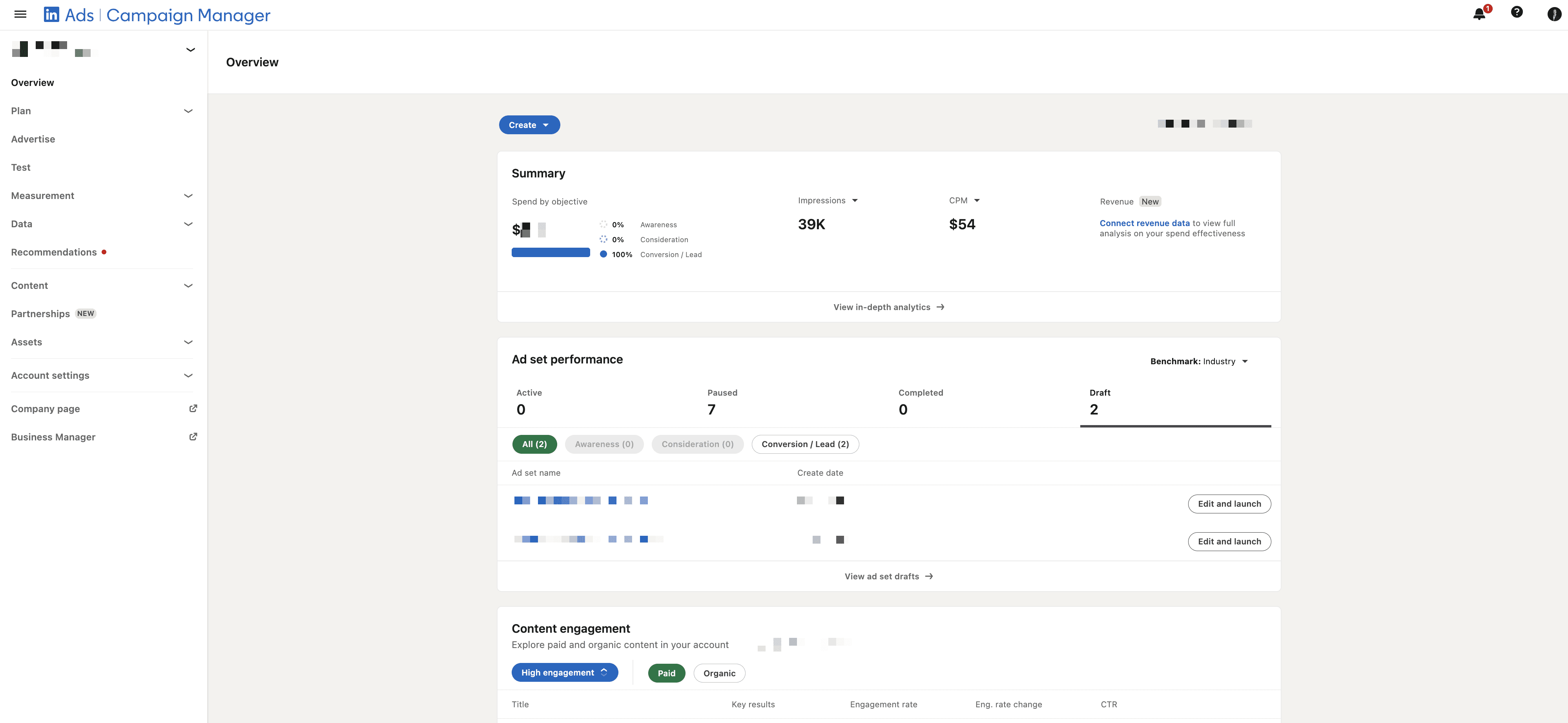
LinkedIn Ads are managed through Campaign Manager (recently rebuilt and rebranded), which now runs on the same broad architecture as the rest of LinkedIn's marketing solutions including the Conversions API, the Insight Tag, Lead Gen Forms, and the Predictive Audiences engine introduced over the last 18 months.
Why LinkedIn Ads Matter for B2B
The honest answer to "should I be running LinkedIn Ads?" depends almost entirely on three things: who you sell to, what your deal size is, and how confident you are in your funnel.
LinkedIn works best when:
Your buyer is reachable by job title (CFO, Head of Engineering, VP Marketing) rather than by demographic or interest
Your deal size justifies a CAC in the hundreds to low thousands of pounds — typically £10,000+ ACV
Your funnel is built to convert solution-aware or product-aware buyers, not cold problem-aware ones
Your sales process can handle the lead volume LinkedIn produces (lower volume, higher quality than Meta)
LinkedIn works badly when:
Your buyer is identifiable by behaviour but not job title (most consumer products)
You're trying to drive cold traffic with low intent into a generic homepage
Your deal size is below £5,000 — the platform's CPCs and CPMs are too high to make the unit economics work
You haven't yet established what messaging actually converts, and you're treating LinkedIn as the testing channel (it's the wrong place to figure out your message — the inventory is too expensive)
A useful frame: LinkedIn is a precision instrument, not a discovery channel. If you don't know who you're targeting, what message converts them, and where they should land, LinkedIn will burn money faster than almost any other paid surface. If you do know those things, LinkedIn is the most direct route to a defined ICP that exists in paid media.
The LinkedIn Ads Cost Reality
Before going any further, let's talk about what things cost. This is where most teams either flinch or get unrealistic, and both reactions cause problems.
The general benchmark ranges in 2026, based on what we see across our client accounts and verified against industry reporting:
Metric | Typical Range | Notes |
|---|---|---|
CPM (cost per 1,000 impressions) | £35 – £80 | Higher for senior roles, niche industries, narrow geos |
CPC (cost per click) | £6 – £14 | Sponsored Content average; varies by format |
CPL (cost per lead, Lead Gen Form) | £40 – £180 | Depends on offer, role, and form length |
Cost per qualified demo | £200 – £800+ | Where most B2B advertisers actually live |
Minimum daily budget | £10 per campaign | Practically you need £40+ per ad set to learn anything |
For comparison, Meta CPCs in B2B typically run £2–£5, and Google Search CPCs in B2B sit in the £4–£12 range depending on category. LinkedIn is structurally more expensive because the inventory is targeted at people who, on average, earn more, control bigger budgets, and represent more downstream revenue per click than members of any other major ad platform.
This is the part most marketers struggle with: a £10 click on LinkedIn is not the same product as a £2 click on Meta. You're paying for the targeting precision, not the click itself. The right comparison is not CPC to CPC but cost-per-qualified-pipeline to cost-per-qualified-pipeline. We routinely see LinkedIn produce CPLs that are 5–10x higher than Meta but with conversion-to-opportunity rates that are 3–5x higher in turn, often producing better blended CAC.
Two further observations on cost:
LinkedIn auction dynamics reward focused campaigns. Tightly defined audiences with strong creative tend to win impressions at lower cost than broad audiences with average creative, because LinkedIn's algorithm favours predicted relevance and CTR. Counterintuitively, narrower targeting often produces lower CPMs once campaigns optimise.
The reported CPCs in Campaign Manager are not the metric you should optimise for. Lead quality, demo show rate, and pipeline contribution are what matters. LinkedIn campaigns that look expensive on a CPC basis frequently produce the cheapest pipeline, and campaigns that look cheap on CPC frequently produce nothing meaningful downstream. The dashboard and the P&L often disagree on this channel.
The Different Types of LinkedIn Ads (And What Each Is Actually Good For)
This is the section most generic LinkedIn Ads guides get wrong. They list all the available formats with feature bullets and call it a day. The harder question, and the one that matters, is what each format is genuinely useful for and where each one fails.
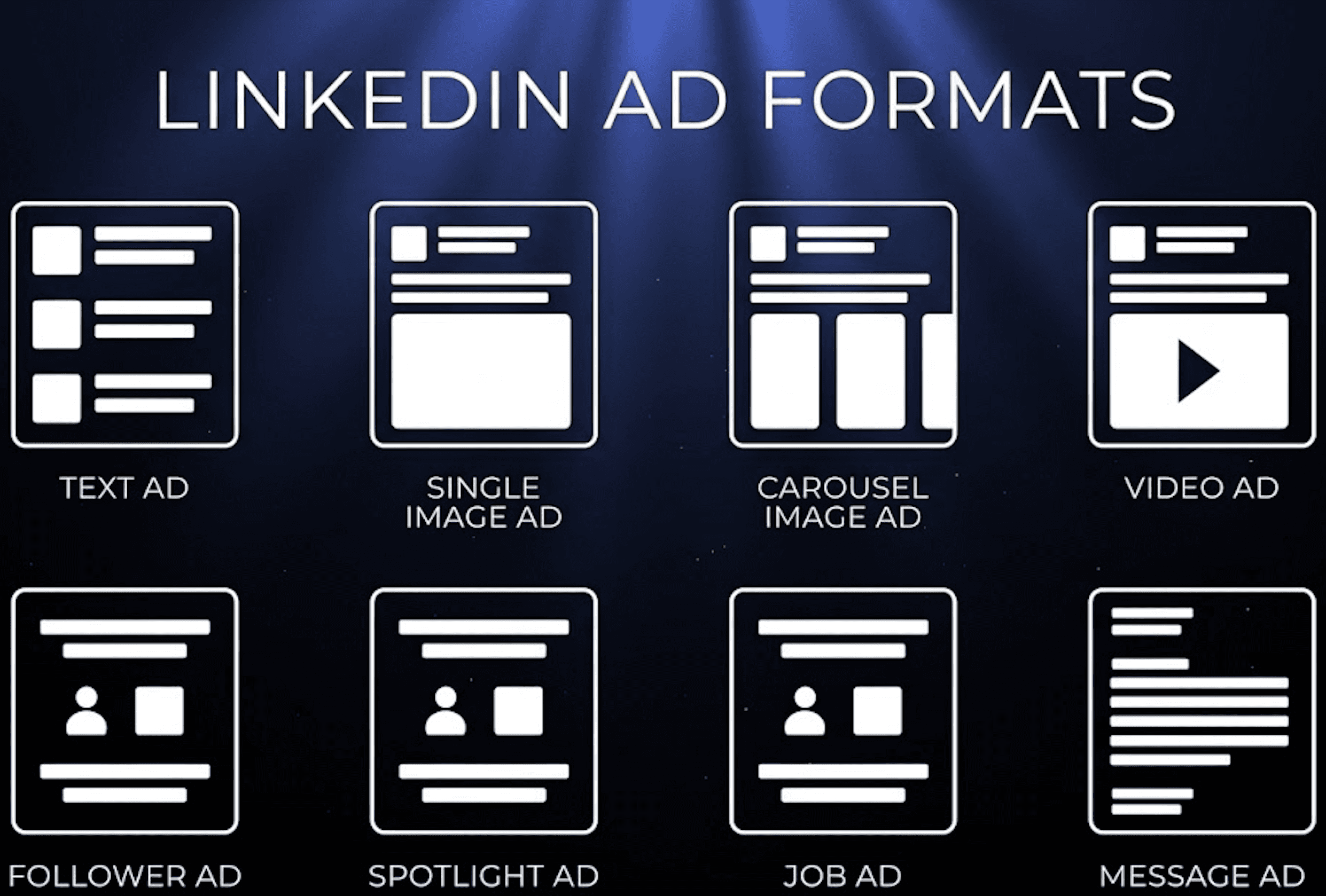
LinkedIn currently offers seven primary ad formats. Here's what each one is, what it actually does well, and where it's overrated.
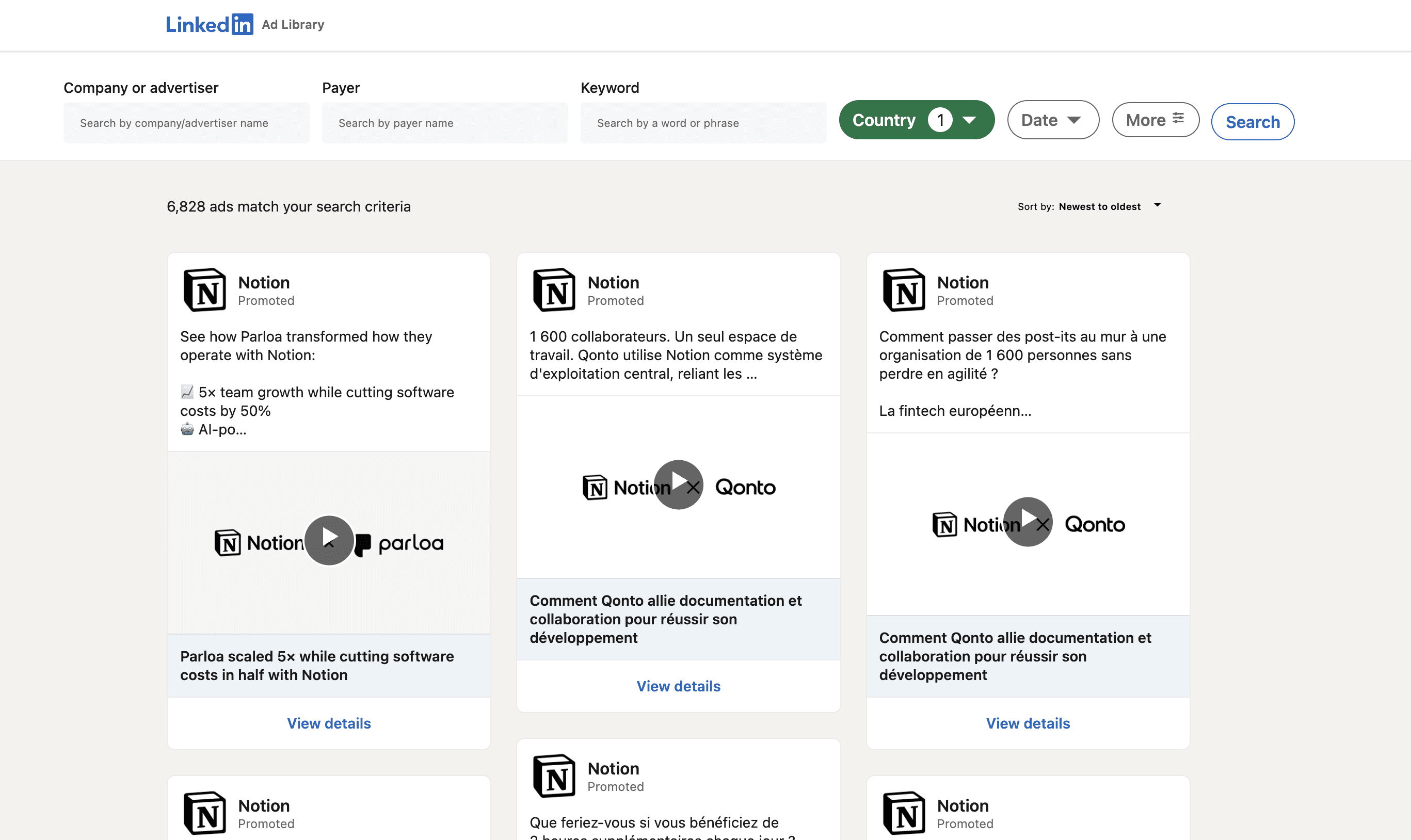
Quick Insider's Tip: How to View Your Competitors' LinkedIn Ads
One of the most underused free resources in B2B paid is the LinkedIn Ad Library. It's a public archive of every ad currently or recently running on LinkedIn, searchable by company, and almost no one I speak to is using it consistently.
Two ways in:
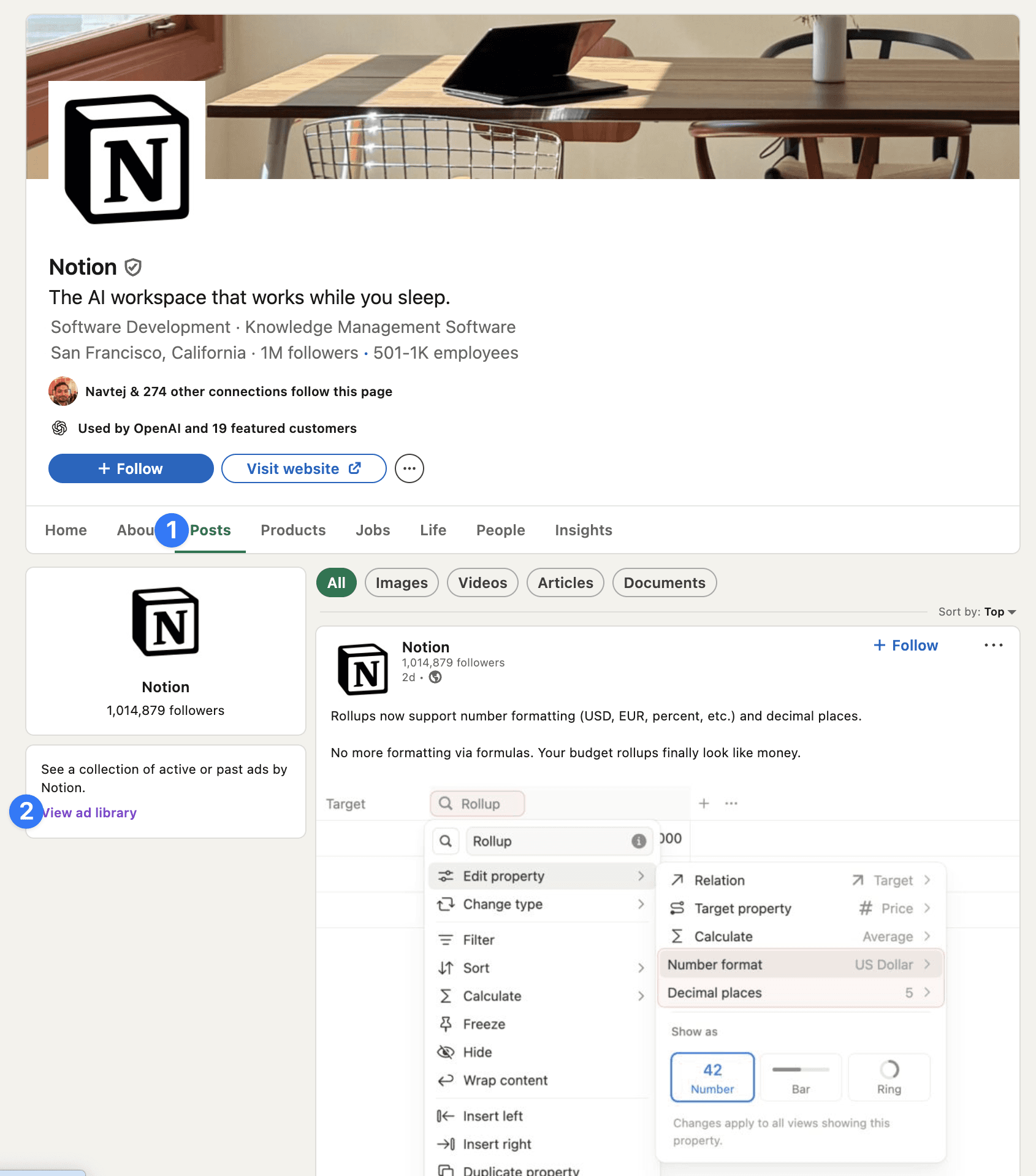
1. Through the company page. Go to any LinkedIn company page (your competitors, your client's competitors, brands you admire). Click the Posts tab in the top navigation. In the left sidebar, you'll see a small panel saying "See a collection of active or past ads by [Company Name]". Click View ad library and you're in.
2. Direct URL. Go to linkedin.com/ad-library and search any company directly. You can filter by country, date range, keyword, and payer. This is the faster route if you already know who you want to study.
1. Single Image Ads (Sponsored Content)
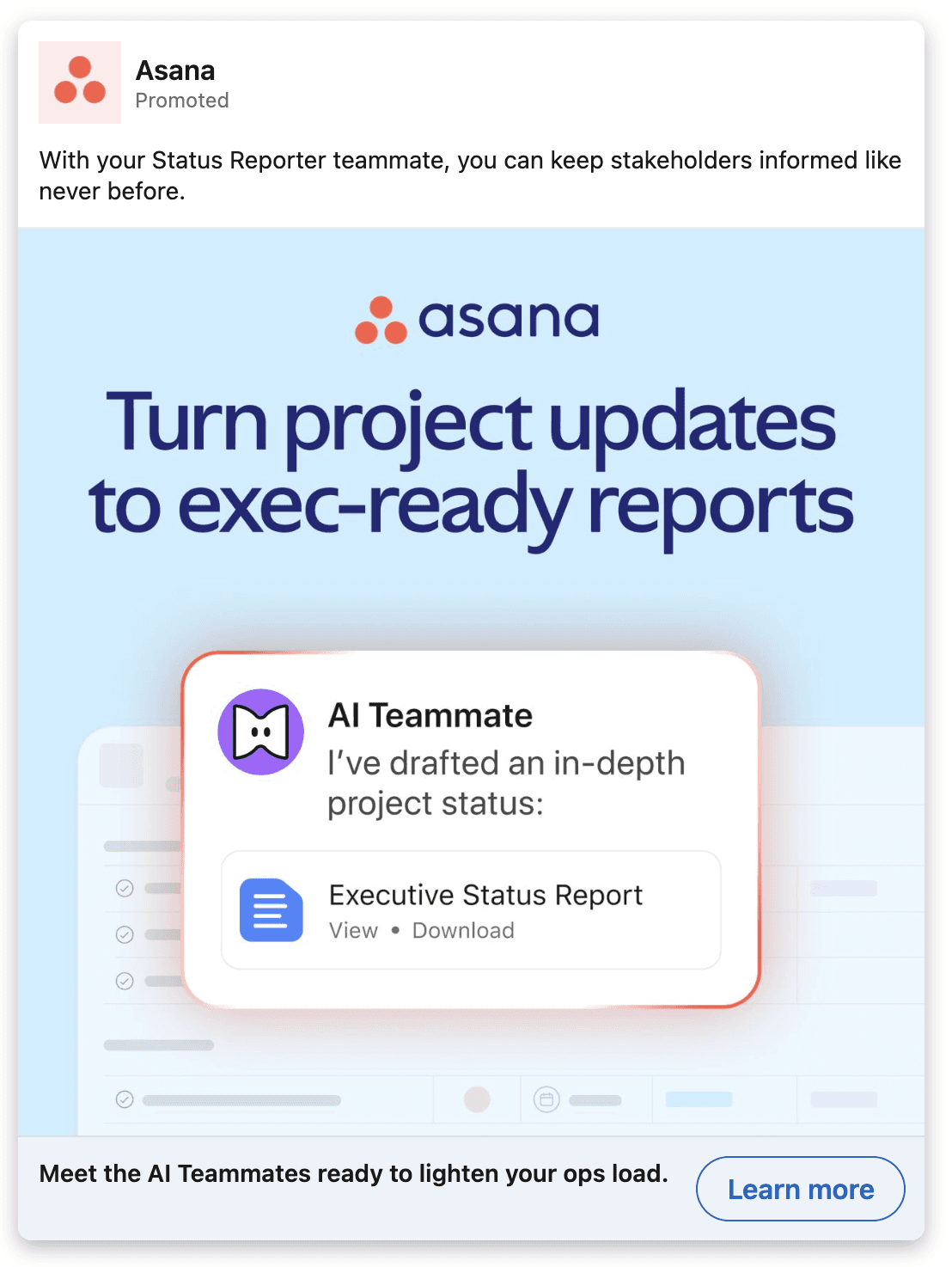
The default workhorse format. A single image, headline, intro text, and CTA, served in the LinkedIn feed.
Best for: Direct response campaigns to defined audiences. Driving traffic to landing pages, lead magnets, or demo bookings. Strengths: Simple to produce, fast to test, and the format with the most predictable performance baselines. Easiest format to iterate on creatively. Weaknesses: Can blend in with organic content, which is good for native feel but bad for stopping the scroll if the creative isn't strong. Visual real estate is small — you cannot rely on busy graphics or dense text. Use when: You're at the testing stage and need to validate which message angles work before investing in heavier formats.
2. Video Ads (Sponsored Content)
Video creative played natively in the LinkedIn feed. Auto-plays muted; sound-on by user choice.
Best for: Educating solution-aware buyers, building familiarity with founder or product narratives, retargeting warm audiences. Strengths: Holds attention longer than static; allows nuanced storytelling; LinkedIn's video viewer audiences are powerful retargeting cohorts (e.g. people who watched 50%+). Weaknesses: Significantly more expensive to produce. Cold video performance is highly creative-dependent — bad video on LinkedIn doesn't just underperform, it actively wastes budget. Use when: You have a clear narrative or proof point that benefits from time-on-screen, and when you've already validated the underlying message angle in static format.
3. Carousel Ads
Multiple cards swipeable in a single ad unit. Each card can have its own image, headline, and link.
Best for: Walking a buyer through a sequenced argument: problem → consequence → solution → proof → CTA. Strengths: Higher engagement than single image ads; allows depth without forcing video production; well-suited to comparison frameworks ("here's what most teams do, here's what we do"). Weaknesses: Easy to over-design and end up with carousels nobody swipes through. The first card has to earn the second, and most don't. Use when: You have a clear sequential story and a designer who understands that each card has to function as both a continuation and a standalone hook.
4. Document Ads
Sponsored PDFs or slide decks that members can preview and download in-feed, with gating behind a Lead Gen Form.
Best for: Top-of-funnel content distribution to problem-aware audiences. Insight reports, frameworks, playbooks, benchmark studies. Strengths: Genuinely high-quality lead generation when the document is substantive. The native preview reduces the trust friction of clicking out to a third-party landing page. CPLs on Document Ads are often the lowest of any LinkedIn format when the content is strong. Weaknesses: The downloaded asset has to be worth the email address. Generic, recycled content tanks both reputation and ROI on this format. The lead is interested in the content, not necessarily the product — the nurture sequence does the heavy lifting. Use when: You have a genuinely valuable piece of content (research, original framework, useful tool) and a competent email or retargeting nurture sequence to convert downloaders into pipeline.
5. Lead Gen Forms
Not strictly a separate ad format — Lead Gen Forms can be paired with Sponsored Content, Video, Carousel, or Document Ads. They open a pre-populated form inside LinkedIn rather than sending the user to your landing page.
Best for: Reducing friction at the point of conversion when you trust LinkedIn's pre-populated data. Strengths: Conversion rates from impression to lead are dramatically higher than landing page funnels — typically 2–5x. Pre-population removes the typing barrier. Especially powerful on mobile, where landing page conversion rates collapse. Weaknesses: Lead quality is consistently lower than landing page leads. Members fill these in casually because the friction is so low. Expect 30–50% of Lead Gen Form leads to be unqualified. You also lose the opportunity to use a landing page as a qualification and education layer. Use when: Volume of top-funnel leads matters more than quality (e.g. content downloads, newsletter signups), or when you have a strong post-form nurture process to qualify leads downstream.
6. Conversation Ads
A multi-step direct message format where the recipient clicks through branching options inside their LinkedIn inbox.
Best for: Account-based campaigns to senior buyers in narrow ICPs. Strengths: Native, one-to-one feel. Allows segmentation within the ad itself ("are you exploring, evaluating, or ready to buy?"). High engagement when targeting is genuinely narrow. Weaknesses: Easy to make feel spammy. Senior buyers in particular have low tolerance for poorly-written conversation ads, and the format is unforgiving — bad copy ruins the brand impression more obviously than a single image ad ever would. Use when: You're running a focused account-based motion to fewer than 5,000 people, your copy is genuinely strong, and you have a specific qualification flow worth segmenting at the ad level.
7. Thought Leader Ads
Paid amplification of organic posts from individual employee accounts (typically founders, executives, or subject-matter experts).
Best for: Building credibility with solution-aware audiences and reinforcing brand authority. Strengths: Significantly higher engagement and trust than branded ads — people respond to people, not logos. Allows you to scale the reach of organic content that's already proven engagement potential. Particularly effective for founder-led B2B brands. Weaknesses: Requires a personal LinkedIn presence with content worth amplifying. Direct response performance is generally weaker than branded formats; this is a brand and trust play more than a conversion play. Use when: You have a founder or senior executive with consistent organic posting that already gets engagement, and you want to extend that reach to specific account or audience targets.
Format-to-Funnel Mapping
The single most useful way to think about LinkedIn ad formats is which funnel stage each is best suited to. This is the table I'd hand a new client on day one:
Funnel Stage | Best Formats | Why |
|---|---|---|
Top (problem-aware, cold) | Document Ads, Thought Leader Ads, Single Image (educational angle) | Build awareness and trust without asking for commitment |
Middle (solution-aware, evaluating) | Carousel, Video, Single Image (differentiation angle) | Educate and differentiate; introduce product clearly |
Bottom (product-aware, retargeting) | Single Image (direct CTA), Conversation Ads, Lead Gen Forms | Remove last friction; book the demo |
The mistake most B2B advertisers make is using a single format for the entire funnel. The result is either expensive demo-booking ads served to cold audiences (terrible CTR, terrible CPA) or content downloads served to product-aware buyers (wasted spend on people who were ready to buy).
Case Study: Ramp AMB LinkedIn Starategy - How They Run One-to-One LinkedIn Ads
The Ad Library is also where you find the genuinely advanced stuff that nobody talks about. Here's a Ramp campaign currently running that's one of the cleanest examples of true 1:1 account-based advertising I've seen on LinkedIn.
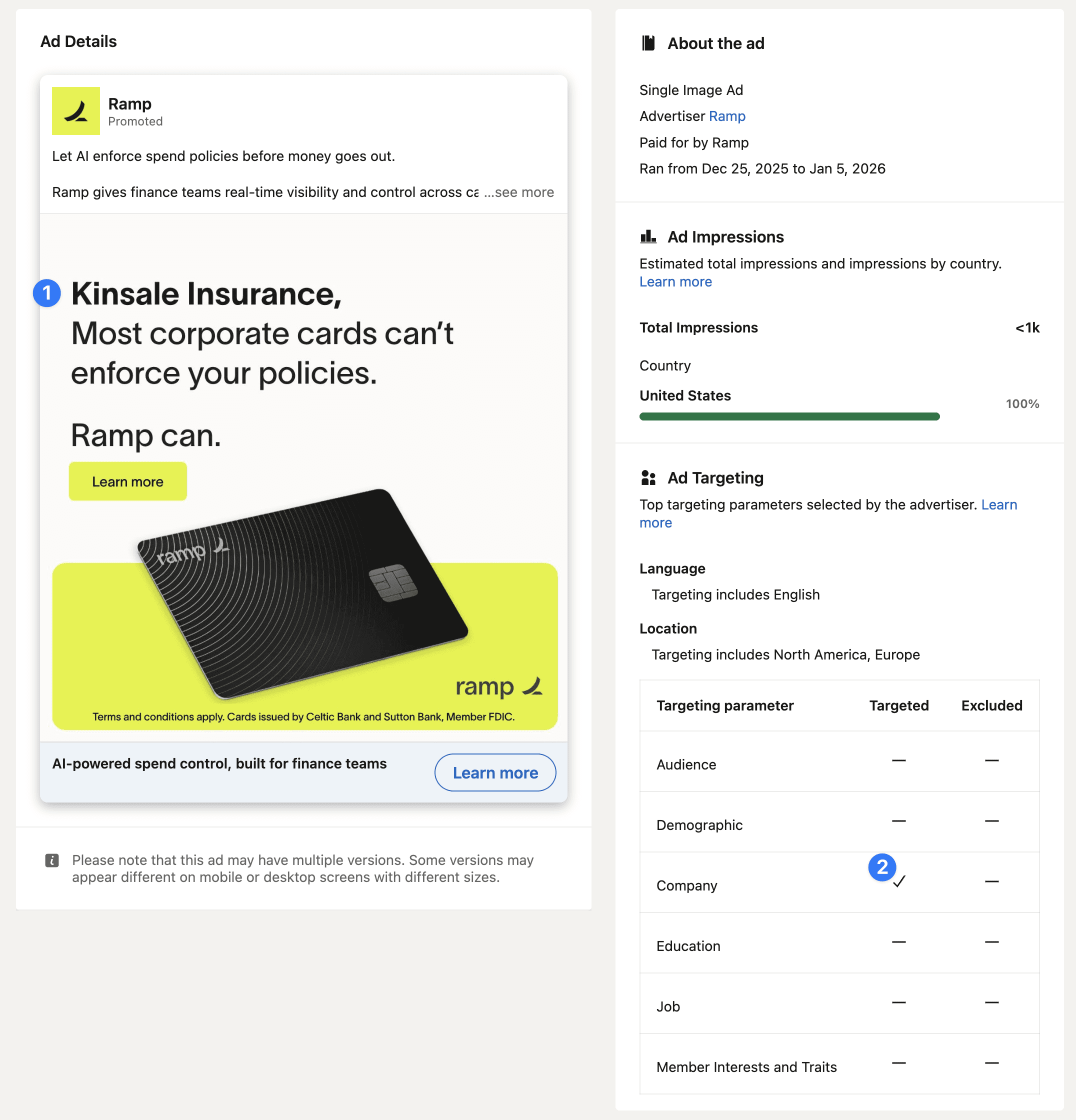
Three things to notice:
1. The company name is in the creative. The ad headline reads "Kinsale Insurance, most corporate cards can't enforce your policies. Ramp can." This isn't a template with dynamic insertion — it's a custom creative built for one named account. Total impressions: under 1,000. The ad is not designed to scale; it's designed to land.
2. The targeting is the company itself. The Ad Library reveals Ramp's targeting parameters: no audience filter, no demographic filter, no job filter. Just Company. A Matched Audience of one. Every impression of this ad is being served to an employee of Kinsale Insurance.
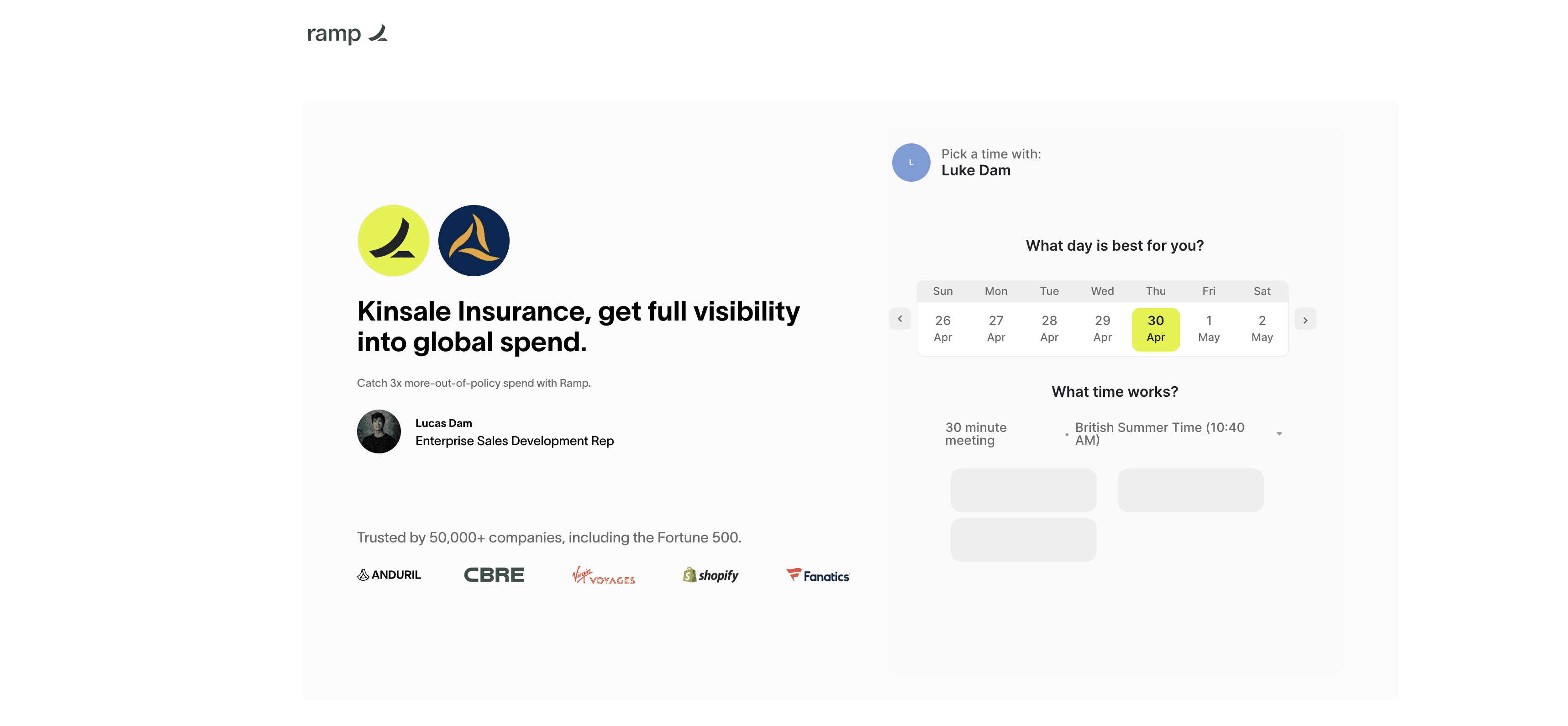
3. The landing page matches the ad. Click through and the destination page reads "Kinsale Insurance, get full visibility into global spend" — same naming, same outcome framing — and it's hosted on Ramp's domain with a Calendly booking widget for a specific Enterprise SDR (Lucas Dam). It's not a generic demo page with the company name swapped in. It's a dedicated experience for one account.
Why this matters:
This is the version of ABM that most B2B teams describe but never actually execute. The hard part isn't the LinkedIn campaign — it's the production cost. Ramp is presumably running dozens or hundreds of these in parallel, each with a custom ad creative, a custom landing page, and a named SDR booking link. That's a real investment in design ops, page templating, and sales coordination — not just a clever ad.
The economics only work when the deal size justifies it. Ramp's enterprise contracts run into six figures annually, so a £500–£1,000 production cost per target account is trivial against a closed deal. For most B2B businesses, the right adaptation isn't to copy this exactly — it's to ask which of your top 50 target accounts genuinely warrant a custom landing page, and to build templated infrastructure that makes producing them fast.
The takeaway: the Ad Library doesn't just show you what your competitors are saying. It shows you how they're operating. The targeting panel is where the strategy actually lives.
How LinkedIn Ad Targeting Actually Works
LinkedIn's targeting capabilities are the platform's primary value proposition. They're also the area where misuse is most expensive. Let's break down what's actually available, then talk about which options matter.
The Targeting Categories
LinkedIn organises targeting into a hierarchy:
Category | Sub-options | Practical Use |
|---|---|---|
Company | Industry, size, name, growth rate, followers, revenue (where available) | Hard ICP filtering — the primary targeting layer |
Job Experience | Job title, function, seniority, years of experience, skills | Refines to specific buyer persona within target companies |
Education | School, field of study, degree | Rarely useful in B2B; more relevant for specific sectors |
Demographics | Age, gender (limited availability) | Rarely the right primary targeting for B2B |
Interests | Member groups, interests, traits | Unreliable; use with caution |
For B2B, the targeting hierarchy that actually works is Company → Function → Seniority → Job Title. Build outward from there, not inward.
Account-Based Targeting (Matched Audiences)
If you have a defined target account list — and you should — uploading it to LinkedIn as a Matched Audience is the highest-leverage targeting decision available on the platform.
Matched Audiences allow you to:
Upload a CSV of company names or LinkedIn URLs and serve ads only to employees of those companies
Combine the company list with role-based targeting to reach the buying committee within target accounts
Build retargeting audiences from website visitors, lead form openers, video viewers, and engagement with prior ads
Build lookalikes from any of the above
For B2B businesses with a defined ICP — and again, you should have one — Matched Audience-based campaigns produce dramatically better results than open targeting. The math is simple: a campaign targeting "VPs of Finance at SaaS companies above £10M ARR" might reach 50,000 people, only a fraction of whom are realistically in-market. A Matched Audience campaign targeting 1,000 named target accounts at the same role and seniority reaches a smaller universe but with significantly higher commercial relevance per impression.
Predictive Audiences
LinkedIn's Predictive Audiences feature (now standard in Campaign Manager) lets the platform build lookalike-style audiences based on a seed of converters from your own data. In our experience this works well when:
Your seed audience is at least 300+ converters with consistent characteristics
The conversion event is meaningful (closed-won or pipeline-qualified, not raw form-fill)
You combine the predictive audience with a hard ICP filter (company size, industry) rather than letting it run open
Predictive Audiences with no constraints tend to drift toward the most reachable, lowest-CPM portions of LinkedIn's user base — which is often not where your real buyers are. Pair them with hard filters or treat the audience size estimates with scepticism.
Targeting Anti-Patterns
The mistakes I see most:
Targeting "Decision Makers" or LinkedIn's pre-built persona filters. These are imprecise and bid up against everyone else using the same defaults. Build your audience definition by first principles instead.
Using interest targeting as a primary filter. Interest data on LinkedIn is significantly less reliable than company and role data. Use it only as a refining layer, never as the foundation.
Audience sizes below 30,000 with broad-format ads. LinkedIn needs a minimum audience size to optimise effectively for broad-format Sponsored Content. If your audience is genuinely tighter than that, switch to Conversation Ads or Lead Gen forms designed for narrow targeting.
Audience sizes above 500,000 with direct response objectives. At that scale you've lost the targeting precision LinkedIn is for. You're paying premium CPMs for what is effectively broad reach — which Meta does better at a fraction of the cost.
Campaign Architecture That Actually Scales
Here's how I structure a LinkedIn account that's set up to scale, based on what we run for clients across fintech and SaaS.
One Campaign per ICP Angle
Don't build one campaign with ten ad sets covering ten audience permutations. Build separate campaigns by angle, each tied to a specific persona, message, and landing destination.
For a typical B2B SaaS client, we'll often run:
Campaign | Audience | Angle | Destination |
|---|---|---|---|
Finance Persona — Cold | CFOs, Heads of Finance, target ICP companies | Efficiency / cost angle | Lead magnet or quiz funnel |
Operations Persona — Cold | Heads of Ops, COOs, same ICP | Workflow / time-saving angle | Lead magnet or quiz funnel |
Founder Persona — Cold | Founders, CEOs, same ICP | Strategic / growth angle | Direct demo funnel |
Target Account — ABM | Matched Audience of named accounts, all relevant roles | Account-specific message | Direct demo funnel |
Retargeting — Warm | Site visitors, video viewers 50%+, lead form openers | Direct CTA, urgency | Direct demo funnel |
This structure gives you clean attribution by angle, avoids LinkedIn's algorithm cannibalising budget across ad sets, and makes scaling decisions straightforward — you double down on the angles producing pipeline and pause the ones that aren't.
Budget Allocation
A starting framework I'd give a B2B SaaS company spending £20,000/month on LinkedIn:
40% on top-of-funnel content distribution (Document Ads, Thought Leader Ads) to a broad ICP-filtered audience — building the warm audience pool
30% on direct demo campaigns to Matched Audiences (named accounts) and tight role-based targeting
20% on retargeting across warm audiences (site visitors, content downloaders, video viewers)
10% on testing — new angles, new formats, new audience cuts
This is a starting point, not a rule. As campaigns mature and you identify the highest-yielding combinations of angle and audience, the allocation shifts. Most mature LinkedIn accounts I run end up with 50%+ of spend on retargeting and Matched Audience campaigns, because that's where the unit economics work hardest.
Bidding Strategy
LinkedIn offers several bidding options. The choice that matters most is between Maximum Delivery (LinkedIn optimises for spend efficiency at any CPC), Cost Cap (you set a maximum acceptable CPL/CPC), and Manual CPC (you set a fixed bid).
Practical guidance:
Stage | Recommended Bidding |
|---|---|
First 7–14 days of a new campaign | Maximum Delivery — let LinkedIn explore the audience |
After 50+ conversions in a campaign | Cost Cap — tighten the unit economics now that you have data |
Highly tested, mature campaigns | Manual CPC if you have strong reasons to override LinkedIn's optimisation |
Cost Cap on a brand-new campaign with no data is the most common bidding mistake I see. LinkedIn doesn't yet know who your converters are; capping cost prematurely starves the campaign and prevents the algorithm from learning. Let it run uncapped for the first two weeks at minimum.
Creative Strategy: What Works on LinkedIn
LinkedIn ad creative follows different rules than Meta. The format is the same — image, headline, copy — but the audience is different and the context is different. People aren't on LinkedIn to be entertained; they're on LinkedIn to be professionally relevant. Creative that works leans into that.
What Works
Specificity over generality. "Cut invoice processing from 20 hours to 2" outperforms "AI-powered automation". Numbers, named outcomes, and concrete proof points convert.
The audience's language, not your product's. If your buyer says "chasing approvals", your ad should say "chasing approvals". If they say "rolling forecast", your ad should say "rolling forecast". Don't translate their pain into your taxonomy.
Pattern interrupts in the visual. LinkedIn's feed is overwhelmingly bland — corporate stock photos, smiling headshots, generic blue gradients. Creative that visually breaks the pattern (bold typography, real screenshots, unexpected imagery, founder selfies) gets disproportionate attention.
Founder-led content for early-stage SaaS and fintech. People trust people, especially founders, especially in markets where the product category is new or the company is unknown. Thought Leader Ads amplifying a founder's post often outperform a polished branded ad targeting the same audience.
Educational angles for cold audiences. Cold LinkedIn audiences don't convert from "book a demo" calls to action. They convert from "here's something useful" calls to action. Lead with utility — a framework, a benchmark, a teardown — and the demo becomes the natural second step.
What Doesn't Work
Stock imagery and generic corporate photography. Reads as low-trust and low-effort, even when the underlying ad is well-positioned.
Long copy without a clear hook in the first line. LinkedIn's intro text truncates after roughly 150 characters on most placements. If your first line isn't compelling, the rest is wasted.
Calls-to-action that ask for too much, too fast. "Book a demo with our team" to a cold audience doesn't work. The buyer doesn't know you. Match the CTA to the awareness level of the audience.
Branded ads that look like organic posts but are clearly ads. This category has the worst engagement on LinkedIn. Either lean into ad polish (clean, designed, clearly branded) or genuinely lean into organic feel (Thought Leader Ads, real founder posts). Don't sit in between.
Creative Testing Framework
The framework we use with clients in their first 60 days on LinkedIn:
Phase | Approach |
|---|---|
Days 1–30 | 3–5 static ad variants per angle. Headline variation only. Same visual format. Goal: identify which message angle has the lowest CPL. |
Days 31–60 | Expand winning angles into new formats (carousel, document, video). Test visual variation on proven messages. Goal: lower CPL on winning angles, broaden creative inventory. |
Days 61+ | Introduce new angles based on first 60 days of data. Begin retargeting creative testing. Layer Thought Leader Ads on the strongest organic posts. Goal: build the testing loop into a sustainable monthly cadence. |
The single biggest principle: establish what message works before testing how it's presented. Changing the angle and the format simultaneously makes it impossible to learn anything. Hold one variable, change the other.
How to Set Up LinkedIn Ads (Step by Step)
For teams genuinely starting from zero, the practical setup sequence:
Install the LinkedIn Insight Tag on every page of your website. This is the foundation for retargeting, conversion tracking, and Predictive Audiences. Verify it's firing correctly via the LinkedIn Insight Tag browser extension.
Set up the Conversions API, especially if you're operating in regions with strong privacy regulation. CAPI offers more reliable conversion attribution than the pixel alone and improves campaign optimisation meaningfully.
Define your target accounts and ICP segments before you build a single campaign. Have a list of named target accounts ready to upload as a Matched Audience and a clear definition of your ICP filters (industry, company size, function, seniority, role).
Build the funnel before the ads. A LinkedIn campaign without a converting funnel is a budget incinerator. The landing page or Lead Gen Form needs to do its job before the ad can prove its job.
Set up campaign architecture by ICP angle, not by ad format. One campaign per persona / angle, each with its own ad sets and ads.
Start with Sponsored Content (single image) at Maximum Delivery bidding. Build a baseline. Don't try to launch six formats simultaneously.
Conversion tracking on day one. The conversion event you optimise for matters enormously. Optimise for Lead in week one; once you have CRM data, optimise for higher-value events (MQL, SQL, Demo Booked).
Set up reporting. Pulling LinkedIn data into Looker Studio or your reporting tool of choice via the LinkedIn Marketing API should be a day-one task. Campaign Manager's native reporting is fine but limited; you'll want cross-channel attribution as soon as multiple campaigns are live.
Plan for a 90-day learning window. LinkedIn's algorithm needs data, and B2B sales cycles are slow. Anyone judging LinkedIn performance after 30 days is judging it before the channel has had time to prove itself.
Tracking and Measurement
Tracking on LinkedIn has three layers. All three matter.
Layer | Purpose | Tool |
|---|---|---|
Platform | Real-time campaign performance — impressions, clicks, conversions, CPL | LinkedIn Campaign Manager |
Site | Behavioural attribution — which ad drove which page visit, which event | Insight Tag, Google Analytics, server-side via CAPI |
Pipeline | Commercial attribution — which ad drove which closed-won revenue | CRM (Salesforce, HubSpot, Close), connected via UTMs |
Most B2B advertisers stop at layer one. The campaigns that actually scale are the ones whose owners insist on layer three: every lead, opportunity, and closed deal can be traced back to the source campaign and ad. Without that, you're optimising on volume metrics and hoping the pipeline catches up.
A few measurement principles worth being explicit about:
Attribution windows on LinkedIn should be longer than Meta. B2B sales cycles are 60–180 days. If your attribution window is 7 days post-click, you're missing most of the conversions LinkedIn is actually driving. Default to 30-day click and 1-day view minimum, ideally longer.
View-through conversions matter on LinkedIn more than people credit. B2B buyers often see the ad, don't click, and search the brand on Google a week later. The LinkedIn impression contributed; last-click attribution misses it. Run brand search trend analysis alongside campaign reports.
Cost per qualified pipeline is the metric you optimise for. CPL is a vanity metric in B2B. CAC by source is the metric. Build the reporting infrastructure to measure that, or you'll inevitably scale the wrong thing.
Common LinkedIn Ads Mistakes (And How to Avoid Them)
The mistakes that cost the most money, in rough order of frequency:
1. Running LinkedIn before the funnel is built. Driving £10 clicks to a generic homepage is the most common form of waste on this platform. Build the conversion funnel first; turn on the ads second.
2. Cold demo asks. Asking a cold audience to book a demo wastes 90% of the click. The CTA needs to match the awareness stage. Cold = lead magnet or content. Warm = direct demo.
3. Treating LinkedIn as a creative testing ground. LinkedIn inventory is too expensive to use as the place where you discover your message. Validate angle in cheaper channels (Meta, organic) and bring proven angles to LinkedIn for scale.
4. Audience sizes that are too narrow. Below 30,000 for broad-format Sponsored Content is generally too small for the algorithm to optimise. If your true target is smaller, switch formats (Conversation Ads) or expand the audience definition slightly.
5. Ignoring retargeting. Most LinkedIn budgets we audit have less than 10% allocated to retargeting. Retargeting on LinkedIn typically produces 3–5x lower CPLs than cold campaigns. Underinvesting here is leaving money on the table.
6. Pausing campaigns too early. B2B sales cycles run long. A campaign that hasn't produced pipeline in 30 days hasn't necessarily failed; it may just not have completed its first cycle. Allow 60–90 days minimum before judging.
7. Optimising on CPC. As noted above, CPC is misleading on LinkedIn. Lead quality varies massively by audience and creative; cheaper clicks often produce no pipeline. Optimise on cost per qualified pipeline or close, not CPC.
8. Not using Lead Gen Forms strategically. Either over-using them (sacrificing lead quality for volume) or never using them (sacrificing volume that nurture could convert). Use them where the funnel logic supports them, not as a default.
9. Keeping creative live too long. LinkedIn creative fatigue sets in faster than people expect, especially within tight Matched Audiences. Refresh ads every 3–4 weeks before CTRs start dropping.
10. No naming convention. Sounds boring; matters enormously. A campaign account with no naming convention becomes unmanageable within three months and ungovernable within six. Establish one before launching campaign one.
How LinkedIn Ads Fit Alongside Other Channels
The honest answer about LinkedIn's role in a B2B paid stack:
LinkedIn alone is rarely the right answer. A balanced B2B paid stack typically combines:
LinkedIn for ICP-targeted reach to specific roles and companies
Google Search for high-intent demand capture (branded, category, competitor)
Meta for cost-efficient creative testing, broad demand generation, and retargeting at scale
Cold outbound (where it fits the model) as a complementary channel for named account engagement
The strategic mistake is treating these as competing channels rather than complementary ones. LinkedIn captures buyers by who they are; Google captures them by what they're searching for; Meta captures them by behavioural signal. The same buyer might cross all three before booking a demo, and a properly architected paid stack appears in front of them at each touchpoint with the right message for that channel.
For early-stage B2B (under £100k MRR), I'd argue LinkedIn comes after Meta and Google in priority, not first. The reason: at small spend levels, the volume of data LinkedIn produces is too low to optimise meaningfully. Build pipeline through cheaper, higher-volume channels first; layer LinkedIn on once you have a known message that works and a budget that can sustain three months of testing.
For mid-market B2B (£100k–£1M MRR), LinkedIn typically becomes the single highest-leverage channel — particularly if your ICP is narrow and identifiable by role.
For larger B2B businesses, LinkedIn is rarely optional. The targeting fidelity is strategically too valuable to ignore, even when CPLs are uncomfortable.
Frequently Asked Questions
How much do LinkedIn Ads cost in 2026? CPMs typically run £35–£80, CPCs £6–£14, and Cost Per Lead £40–£180 for Lead Gen Forms. Cost per qualified demo for B2B sits in the £200–£800 range depending on the ICP and offer. The minimum daily budget is £10 per campaign, but practical minimums for meaningful learning are closer to £40–£50 per ad set.
Are LinkedIn Ads worth it for small businesses? For small businesses with deal sizes below £5,000, generally no. The CPC and CPL ranges make the unit economics difficult unless you have an unusually high-LTV product. Above £10,000 deal sizes, LinkedIn becomes increasingly viable, and at £25,000+ deal sizes it's frequently the best paid channel available.
What's the best LinkedIn ad format for B2B? There isn't one. Different formats serve different funnel stages. Document Ads and Thought Leader Ads work best for cold, problem-aware buyers. Single Image and Carousel work best for solution-aware buyers. Single Image and Conversation Ads work best for retargeting and product-aware audiences. The best account uses a combination matched to funnel stage.
How long should I run a LinkedIn campaign before judging performance? Minimum 60 days, ideally 90. B2B sales cycles run long, LinkedIn's algorithm needs data, and creative fatigue patterns become visible only after the first refresh cycle. Anyone making campaign-killing decisions inside 30 days is making them too early.
Are Lead Gen Forms or landing pages better? Different tools for different jobs. Lead Gen Forms produce 2–5x higher form-fill rates but lower lead quality. Landing pages produce fewer leads but better-qualified leads. The right answer depends on your funnel — if you have strong post-form nurture, Lead Gen Forms scale better; if you depend on the landing page to qualify, send traffic there.
What targeting should I start with? Start with Matched Audiences if you have a target account list. If you don't, start with Company Industry + Company Size + Job Function + Seniority. Ignore interest targeting and pre-built audience templates initially. Build the audience definition from first principles based on your ICP.
Can I run LinkedIn Ads without a sales team? Technically yes, but it's usually a sign of mismatched expectations. LinkedIn produces leads that benefit from human follow-up. If you're a self-serve product targeting a LinkedIn-reachable audience, the channel is generally over-priced for your model — Meta and Google will produce better economics.
How do I tell if my LinkedIn campaign is working? The metrics that matter, in order: cost per qualified pipeline, demo show rate from LinkedIn leads, opportunity-to-close rate from LinkedIn-sourced opportunities, and blended CAC across the channel. CPL and CPC alone don't tell you anything reliable.
Should I use LinkedIn's Predictive Audiences? Yes, with caveats. Predictive Audiences work well when paired with hard ICP filters (company size, industry) and seeded from at least 300 high-quality converters. They work badly when used open with no filters — the platform tends to drift toward broader, lower-CPM audiences that aren't your buyer.
What's the difference between Sponsored Content and Sponsored Messaging? Sponsored Content is feed-based (Single Image, Video, Carousel, Document) and shows up natively in the LinkedIn home feed. Sponsored Messaging is inbox-based (Message Ads, Conversation Ads) and shows up in the LinkedIn messaging interface. Different inventory, different psychology, different best-use cases.
Do LinkedIn Ads work for awareness-only campaigns? LinkedIn is expensive for pure awareness. If your goal is reach with no conversion expectation, Meta and YouTube produce significantly cheaper CPMs. LinkedIn earns its premium when targeting precision is the value being bought, not when raw impressions are.
The Bottom Line
LinkedIn Ads is the most surgically targeted paid channel in B2B and the most expensive. Both of those things are true at the same time, and that's the channel's defining characteristic.
The companies that win on LinkedIn are the ones who treat the platform's costs as the price of admission for its precision. They build their funnel before they build their campaigns. They define their ICP before they define their targeting. They match their creative to awareness stage. They measure on pipeline, not on dashboard metrics. They run for 90 days before they make scaling decisions.
The companies that lose on LinkedIn are the ones who treat it as another paid channel to layer on, expect Meta-style economics from inventory that costs 5x more, and judge performance on click-through rates after two weeks of running.
The platform isn't getting cheaper, the targeting isn't getting less precise, and the buyers worth reaching aren't going to be reachable any other way at this fidelity. For B2B businesses with the right deal size and a clear sense of who they sell to, LinkedIn Ads is rarely optional and rarely substitutable. The question is not whether to run it, but whether to run it well enough to justify the spend.
Run it well, and it becomes the most defensible source of pipeline in the business. Run it badly, and it becomes the line item the CFO asks about every month.
Traction is a B2B performance marketing agency building predictable revenue engines for SaaS, fintech and professional services companies. We specialise in paid acquisition, funnel architecture and conversion optimisation across LinkedIn, Meta, Google, and emerging channels including ChatGPT Ads. If you want to talk about how LinkedIn Ads fits into your acquisition strategy, get in touch.